Table of Contents
You know that queasy feeling when a critical system goes down, and nobody can explain why? Nine times out of ten, the answer is sitting right in front of you, or rather, baking in a room somewhere. Server rooms run hot by nature, and when temperature control slips through the cracks, the consequences hit fast and hard. Server room temperature control is one of those things that feels like background noise until it becomes a very loud, very expensive problem.
The good news? Most of it is preventable. Here's what you need to know.
Why Heat Is Your Server Room's Biggest Enemy
Servers generate a lot of heat. They're designed to run continuously, and that constant workload means constant thermal output. Left unchecked, that heat builds up in ways that degrade hardware faster than almost any other factor.
What happens when temperatures climb past safe limits isn't dramatic at first, it's gradual. Processors slow themselves down through thermal throttling to avoid damage. Hard drives start showing read errors. Power supplies work harder and fail sooner. The performance problems appear before anyone realizes the room is running too warm, and by the time someone investigates, the hardware has already taken a hit.
Thermal stress is cumulative. A server running five degrees too warm for six months doesn't announce the damage, it just fails earlier than it should have.
What the Numbers Actually Mean
The industry standard operating range for most server equipment sits between 64°F and 80°F (18°C to 27°C). ASHRAE, the organization that sets a lot of these guidelines, has progressively widened acceptable ranges as equipment has gotten more heat-tolerant, but the middle of that range, around 70°F to 75°F, remains the sweet spot for most environments.
Humidity matters just as much. The recommended range is 40% to 60% relative humidity. Drop below 40% and static electricity becomes a real risk, the kind that can quietly damage sensitive components over time. Push above 60% and condensation starts becoming a concern, especially around cold surfaces near air conditioning equipment.
The other number most people overlook is consistency. Temperature swings, even within the safe range, cause expansion and contraction in circuit board materials and solder joints. A room that cycles between 65°F and 80°F daily is actually harder on hardware than one that holds steady at 78°F. Stability matters more than perfection.
The Hot Aisle/Cold Aisle Layout
Server racks pull cool air in from the front and push hot air out the back. This sounds simple, but the way racks get arranged in practice often works against that airflow pattern entirely.
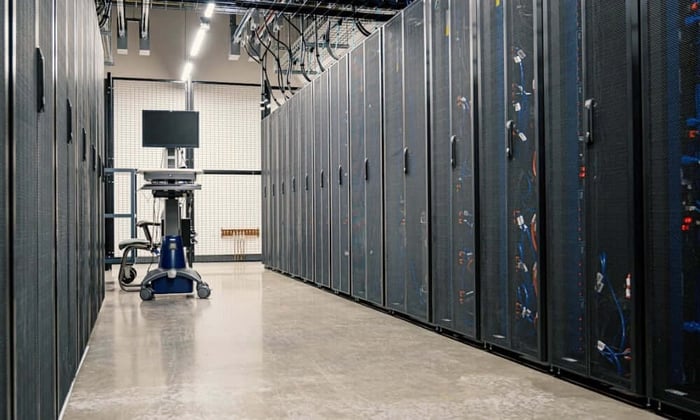
The hot aisle/cold aisle approach solves this by alternating rack orientations. Server fronts face one aisle (the cold aisle, where cooled air is delivered), and server backs face the opposite aisle (the hot aisle, where exhaust heat is collected and removed). This keeps hot exhaust air from circulating back into server intakes, which is exactly what happens in a disorganized room where racks face every direction.
A few things make or break this layout in practice:
Blanking panels fill empty rack spaces. Without them, hot air from the back of the rack recirculates through the gaps and right back into the intake. This is one of the most common and easily fixed problems in server room airflow.
Cable management keeps airflow paths clear. Bundled cables stuffed into airflow channels are essentially a dam.
Raised floor tile placement matters. Cold air delivered through perforated tiles needs to be positioned in front of server intakes, not in the middle of hot aisles.
Cooling Systems: What Actually Works
Standard building HVAC is not built for server rooms. Office air conditioning is designed to handle the occupancy-based heat load of people and lighting, not the dense, continuous thermal output of server equipment. Using building HVAC as a primary cooling strategy works until it doesn't, and when it fails, it usually fails without warning.
Precision air conditioning units (also called computer room air conditioners, or CRACs) are built specifically for this environment. They maintain tighter temperature and humidity tolerances, they run continuously, and they're designed to handle the load densities that come with modern server equipment.
Redundancy is worth building in from the start. A single cooling unit that fails on a Friday afternoon means a very bad weekend for your IT team. Two units running at partial capacity means the room stays cool if one goes offline. The cost of a second unit is almost always less than the cost of a major hardware failure.
Monitoring: The Part Most Teams Skip
Good monitoring is the difference between catching a cooling problem and discovering one after the damage is done.
Temperature sensors placed at intake points on server racks give a much more accurate picture than a single sensor on the wall. The room might average 72°F, while specific rack intakes are reading 85°F, a wall sensor won't tell you that. Multiple sensors, positioned thoughtfully, give you real data about what your equipment is actually experiencing.
Alerts need to be set at thresholds that give you time to respond, not at thresholds that tell you things have already gone wrong. An alert at 80°F gives an IT team time to investigate. An alert at 90°F means the equipment has been stressed for a while before anyone found out.
This is where reliable environmental monitoring earns its keep. A good temperature monitoring solution doesn't just log data, it notifies the right people immediately when conditions drift outside safe ranges. The Necto temperature monitor, for instance, operates on 4G LTE cellular connectivity rather than the network infrastructure it's monitoring, which means it keeps sending alerts even when the primary network or power goes down. That independence matters because a lot of server room emergencies start with a power or network event, exactly the moment you need your monitor working the most.
Redundant Power and What It Has to Do With Temperature
Cooling systems run on power. When power fails, cooling stops. The two are more connected than people sometimes realize.
An uninterruptible power supply (UPS) keeps cooling equipment running during short outages. A generator covers longer ones. The goal isn't just keeping servers online, it's keeping the cooling systems that protect servers online. A server room that loses power but keeps its cooling running is in a much better position than one where everything shuts off at once.
This also means power monitoring belongs in the same conversation as temperature monitoring. Knowing the moment power drops, before temperatures start climbing, gives IT teams a head start on the response.
Maintenance That Actually Prevents Problems
Cooling systems don't fail randomly, they usually give signs. Reduced airflow, inconsistent temperatures, and unusual sounds from HVAC equipment. Regular maintenance catches these signs before they turn into failures.
Practically, this means:
Replacing air filters on a set schedule, not just when they look dirty
Inspecting cooling units for refrigerant levels, coil condition, and proper function
Checking that hot aisle containment (if installed) is intact and that panels haven't been left open
Testing UPS systems under load, a UPS that hasn't been tested in two years may not behave the way you expect during an actual outage
Reviewing temperature trend data to catch slow drifts before they become acute problems
Trend data is underused in most server rooms. If intake temperatures have been creeping up by a degree per month for six months, something is changing, equipment is being added, a filter is getting clogged, or a cooling unit is losing capacity. Catching that trend early costs much less than responding to a failure.
What Keeps the Lights On
Server room temperature control isn't complicated in concept, keep the room cool, keep airflow organized, monitor conditions, and respond fast when something changes. The execution requires attention and consistency, which is where most problems actually originate.
The teams that handle this well tend to share a few things: they monitor proactively rather than reactively, they treat maintenance as non-negotiable rather than optional, and they build in redundancy before they need it rather than after.
Your IT infrastructure represents a real investment. The environmental conditions it runs in either protect that investment or quietly work against it. Getting temperature control right is one of the highest-return, lowest-drama things any IT operation can do.
Reach out to Necto today to learn how reliable temperature and power monitoring can fit into your server room strategy, and stay ahead of the problems before they find you.
FAQs
Why is server room temperature control important?
Server room temperature control is critical because servers generate significant heat during continuous operation. If temperatures rise beyond safe limits, hardware components can degrade faster, performance may slow due to thermal throttling, and systems can eventually fail. Maintaining stable temperatures protects equipment, reduces downtime, and extends the lifespan of IT infrastructure.
What is the ideal temperature for a server room?
Most industry guidelines recommend keeping server rooms between 64°F and 80°F (18°C to 27°C). Many IT teams aim for the middle of that range, around 70°F to 75°F, to balance efficiency and equipment longevity. Maintaining consistent temperatures within this range is often more important than achieving a perfect number.
What humidity level is recommended for a server room?
The recommended humidity range for server rooms is typically 40% to 60% relative humidity. Low humidity increases the risk of static electricity, which can damage sensitive components, while high humidity can lead to condensation and corrosion. Proper humidity control helps maintain a stable and safe environment for servers.
What is a hot aisle/cold aisle layout?
A hot aisle/cold aisle layout is a server rack arrangement designed to improve airflow and cooling efficiency. Server fronts face the cold aisle where cooled air is delivered, while the backs of racks face the hot aisle where warm exhaust air is removed. This layout prevents hot air from circulating back into server intakes and helps maintain consistent cooling throughout the room.
Why are blanking panels important in server racks?
Blanking panels fill unused rack spaces to prevent hot exhaust air from recirculating to the front of the rack. Without these panels, hot air can flow through empty gaps and mix with incoming cool air, reducing cooling efficiency and causing higher intake temperatures for servers.
Should server rooms use dedicated cooling systems?
Yes. Standard building HVAC systems are not designed to handle the constant heat load produced by server equipment. Dedicated cooling systems such as precision air conditioning units or computer room air conditioners (CRAC) are designed to maintain consistent temperatures and humidity levels in high-density IT environments.
How many temperature sensors should a server room have?
A server room should use multiple temperature sensors placed near server rack intake points, rather than relying on a single wall-mounted sensor. This provides a more accurate view of the conditions servers actually experience and helps detect localized hot spots before they cause problems.
Why is temperature monitoring important for server rooms?
Temperature monitoring allows IT teams to detect overheating risks before they lead to system failures. Monitoring tools can provide real-time alerts when temperatures exceed safe thresholds, giving teams time to respond quickly and prevent damage to servers and networking equipment.
What role does power backup play in server room temperature control?
Cooling systems depend on electricity, so power outages can quickly lead to rising temperatures. Backup solutions such as uninterruptible power supplies (UPS) and generators help keep cooling systems running during outages, protecting servers from overheating while power is restored.
How often should server room cooling systems be maintained?
Server room cooling systems should be inspected and maintained regularly. This includes replacing air filters on schedule, checking refrigerant levels, inspecting airflow paths, and testing backup power systems. Routine maintenance ensures cooling equipment operates efficiently and helps prevent unexpected failures.
What are common signs of server room cooling problems?
Warning signs include rising intake temperatures, reduced airflow, unusual HVAC noises, inconsistent room temperatures, or frequent equipment overheating alerts. Monitoring temperature trends can help identify these issues early before they cause downtime or hardware damage.
Can temperature fluctuations damage servers?
Yes. Frequent temperature swings can cause expansion and contraction in circuit boards and solder joints. Over time, this thermal stress can weaken components and lead to premature hardware failure. Maintaining stable environmental conditions is essential for long-term reliability.