Table of Contents
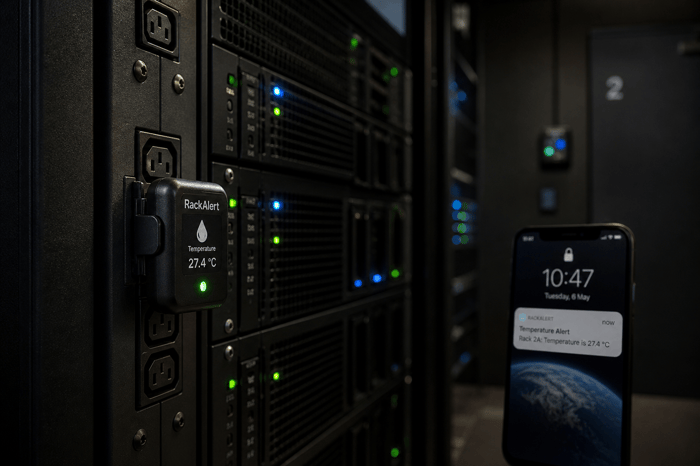
If your server room cooling system fails at 2 a.m. on a Friday, the first thing you will wish you had is a sensor that caught it three hours earlier. Server room HVAC sensors are the difference between a minor alert and a room full of failed hardware. This article covers what to monitor, where sensors actually belong, and the one angle most guides skip: what happens when the cooling fails at the same moment the network does.
Three measurements drive the most risk in any server room: rack-level inlet air temperature, relative humidity between 40 and 60 percent, and power status. ASHRAE recommends server inlet temperatures stay between 64.4 and 80.6 degrees Fahrenheit for standard A1-class equipment. A monitor that tracks all three and alerts over cellular when the network is down covers the main failure scenarios.
Why Standard Building Sensors Are Not Enough
A building automation sensor mounted in the hallway or near a supply vent will not tell you what is happening at the front face of your server rack. Standard HVAC sensors are calibrated for general office environments where temperature gradients are measured in tenths of a degree. In a server room, the difference between the cold aisle and the hot aisle can be 20 to 30 degrees Fahrenheit within the same footprint. A sensor reading 72 degrees near the ceiling means nothing if the bottom of your rack is pulling in 85-degree recirculated air.
The other problem is response time. Office-grade sensors typically report in 15-minute intervals, which works fine for building management. A server room can reach dangerous inlet temperatures in under 10 minutes if a CRAC unit loses power or a damper closes unexpectedly. Sensors built for server environments update more frequently and sit where the risk is, at rack inlets, not on walls.
The Three HVAC Measurements That Matter Most
Temperature is the measurement most IT teams focus on, and for good reason. ASHRAE TC 9.9 Thermal Guidelines defines recommended inlet air temperature ranges by equipment class. For most standard servers (A1 class), the range runs from 64.4 to 80.6 degrees Fahrenheit. A2-class equipment extends the upper limit to 95 degrees. Operating above those ranges consistently shortens hardware lifespan and increases the probability of thermal shutdown.
Humidity is the second measurement that gets teams into trouble when they ignore it. Relative humidity below 40 percent increases the risk of electrostatic discharge, which can silently damage memory modules, storage drives, and processor sockets. Above 60 percent, the risk shifts to condensation and corrosion on circuit boards. The ASHRAE-recommended range of 40 to 60 percent is the target most facilities aim for, and drifting outside it, especially in a room with aging CRAC units, happens faster than most people expect.
Power status is the third measurement, and it is the one most commonly left out of HVAC monitoring setups. A temperature sensor that stops reporting is not the same as one reporting a normal reading. When power to the cooling unit is interrupted, you need an alert immediately, not after a 10-minute polling interval. Power loss monitoring closes the gap between the HVAC stopping and finding out about it.
Where Server Room HVAC Sensors Actually Belong
The most common placement mistake in small server rooms is mounting a single temperature sensor on the wall near the door. That reading reflects ambient room air, not what your equipment is ingesting. Proper placement puts sensors at the front of racks at multiple heights, top, middle, and bottom, because heat stratification is real. Hot air rises, and the top of a rack without proper airflow management can run 10 to 15 degrees warmer than the bottom.
Sensors near supply vents read artificially low because they measure cooled air before it passes through any equipment. Sensors near exhaust vents read high, but that is exhaust air, not the inlet condition your servers are actually experiencing. Place the first sensor at the inlet of the highest-density rack in the room, where thermal stress shows up first.
For rooms with hot aisle and cold aisle containment, differential pressure tells you whether containment is working. A drop signals a breach, an open door, or a blocked vent before temperatures have time to climb.
What Happens When the HVAC and the Network Fail Together
This is the scenario most monitoring setups are not built for. Cooling failures are often triggered by power events, such as a circuit breaker tripping, a UPS failing, or utility power going out. In those moments, the local network monitoring your sensors may go down at the same time as the HVAC it is watching. If your sensors report over the same network that just lost power, you get no alert at the exact moment you need one most.
Out-of-band monitoring, using a cellular connection independent of the building network, solves this directly. A sensor reporting over 4G keeps sending alerts even when local power and network infrastructure are both down. For edge locations, branch offices, and small server rooms without redundant network paths, that independence is the practical difference between catching a problem in time and discovering it the next morning.
Necto gives IT teams a cellular-based, out-of-band monitoring option that does not rely on the network it is meant to protect. It monitors temperature and power status around the clock, sends alerts via text and app when conditions go beyond safe limits, and continues running on its 72-hour battery through a power outage. For edge locations, remote IDFs, or data closets without reliable network access, it is a straightforward option.
Before the Next Cooling Event
Server room HVAC monitoring is not complicated, but the gap between basic and adequate is wider than most IT teams realize. A wall-mounted temperature sensor misses rack-level hotspots. Sensors without power monitoring leave teams blind during the events most likely to cause thermal damage. Any monitoring solution that depends on the local network cannot alert you when the network itself is part of the failure. The fix is mostly about placement, scope, and making sure at least one alert path does not share infrastructure with the room it is watching.
If your server room loses cooling and the network goes down at the same time, you need a monitor that keeps alerting regardless. Contact Necto today and get a cellular temperature and power monitor that works independently of the network it is watching.
FAQs
What temperature range should a server room stay within?
ASHRAE recommends inlet air temperatures between 64.4 and 80.6 degrees Fahrenheit for standard A1-class servers, up to 95 degrees for A2-class. Most facilities target 68 to 77 degrees as a practical operating range.
How many HVAC sensors does a small server room need?
A small room with one or two racks needs a minimum of two sensors, one at the rack inlet and one near the cooling unit. Rooms with multiple racks benefit from sensors at each rack inlet at multiple heights.
What humidity level is safe for a server room?
The ASHRAE-recommended range is 40 to 60 percent relative humidity. Below 40 percent, electrostatic discharge risk increases. Above 60 percent, condensation and corrosion become concerns.
Do server room sensors need to connect to the building network?
Most sensor systems rely on the local network, creating a blind spot when power and HVAC fail together. Cellular sensors that report over 4G keep sending alerts even when building infrastructure is down. See how Necto handles this at getnecto.com.
How often should server room temperature sensors update readings?
Necto updates every 10 minutes during normal conditions and switches to real-time reporting when an alert condition is detected, so there are no gaps in coverage during a developing problem.