Table of Contents
- What ASHRAE Recommends for Server Room Temperature
- Humidity: The Monitoring Variable That Gets Ignored Until It Causes Damage
- Where Server Room Temperature Sensors Actually Belong
- Power Monitoring: The Alerting Layer Most IT Teams Skip
- Why the Network Cannot Monitor Itself
- Building a Practical Monitoring Checklist for Your Server Room
- Where to Start With Server Room Temperature Monitoring
- FAQs
If you manage a server room, whether it is a purpose-built data center wing or a converted closet running half the company's critical infrastructure, temperature is the variable that turns a quiet weekend into a hardware replacement project. Most thermal failures do not happen suddenly. A CRAC unit has been struggling for weeks, a hot spot develops at the top of the highest-density rack, a breaker trips and nobody finds out until morning. Server room temperature monitoring gives you the visibility to stop that sequence before it reaches the hardware. This guide covers every layer of it: the temperature and humidity numbers that matter, where sensors actually belong, why power status is the alerting gap most teams leave open, and what happens when the network your monitors report over goes down at the same moment your cooling does.
Server rooms should maintain inlet air temperatures between 64.4 and 80.6 degrees Fahrenheit for standard A1-class equipment, per ASHRAE TC 9.9 guidelines. Relative humidity should stay between 40 and 60 percent. A monitoring setup that covers temperature, humidity, and power status together, and sends alerts over a cellular connection independent of the building network, covers the failure scenarios that purely network-dependent systems miss.
What ASHRAE Recommends for Server Room Temperature
ASHRAE TC 9.9 Thermal Guidelines is the reference most data center operators and IT managers use when setting temperature thresholds. For standard A1-class servers, which covers most commercial rack equipment, the recommended inlet air temperature range runs from 64.4 to 80.6 degrees Fahrenheit. A2-class equipment, designed for higher operating environments, extends the upper limit to 95 degrees. Most facilities target 68 to 77 degrees as a practical working range, which leaves enough margin below the A1 ceiling to absorb load spikes and HVAC fluctuation without constant alerts.
These are inlet air temperatures, not ambient room temperatures, and that distinction changes where sensors belong. A thermometer mounted on the wall near the ceiling might read 72 degrees while the bottom of your densest rack pulls in 85-degree recirculated air from an adjacent hot aisle. The ASHRAE targets apply to the air entering your equipment, which is why sensor placement at the rack face, not on a wall, is the correct approach.
Operating outside recommended ranges consistently does not always cause immediate failure. What it causes is accelerated degradation: fan bearings wear faster, capacitors degrade sooner, and thermal cycling increases the probability of solder joint failure over time. The cost of temperature-related hardware failure is rarely just the replacement hardware. It is the labor, the downtime, and whatever was running on the equipment when it failed.
Humidity: The Monitoring Variable That Gets Ignored Until It Causes Damage
Relative humidity gets less attention than temperature in most IT monitoring conversations, which is a problem because drifting outside the safe range causes two different types of damage depending on which direction it goes.
Below 40 percent relative humidity, the risk is electrostatic discharge. Dry air holds static charge more readily than moist air, and in a server room where people walk around and touch equipment, that increases the probability of ESD damage to memory modules, storage drives, and processor sockets. ESD damage is particularly difficult to diagnose because it often does not cause immediate visible failure. A component damaged by static discharge may operate normally for days or weeks before failing, making the root cause hard to trace.
Above 60 percent relative humidity, the risk shifts to condensation and corrosion. Circuit boards exposed to sustained high humidity develop oxidation on connector contacts and solder joints, creating resistance and intermittent failures that get misread as software or firmware problems. A CRAC unit that is short-cycling or losing dehumidification capacity can push a room above 60 percent faster than most teams expect, especially in summer, after a coil cleaning, or when an aging system is running near its limits.
The ASHRAE-recommended range of 40 to 60 percent is the target most facilities aim for. A monitoring setup that tracks humidity alongside temperature gives you warning before either boundary becomes a problem, not after equipment starts throwing errors.
Where Server Room Temperature Sensors Actually Belong
The most common placement error in small server rooms is a single temperature sensor mounted on the wall near the door, or worse, near a supply vent. Both locations produce readings that look fine on a dashboard while problems develop at rack level.
A sensor near the supply vent reads artificially low because it measures cooled air before it passes through any equipment. A wall sensor in the center of the room gives you average ambient air temperature, which tells you nothing about what your hardware actually ingests. Proper placement puts sensors at the inlet face of racks at multiple heights, because heat stratification in a server room is measurable and consistent. The top of a rack without adequate airflow management can run 10 to 15 degrees warmer than the bottom.
For a small room with one or two racks, the minimum is one sensor at the inlet of each rack at mid-height, plus one sensor positioned to catch return air from the cooling unit. If you have more than two racks, add sensors at the top of the highest-density row, because that is where hot spots develop first. The article on server room HVAC sensors covers the specific placement logic for multi-rack rooms and rooms using containment strategies in more detail.
Rooms using hot aisle and cold aisle containment benefit from additional monitoring to confirm containment integrity. A breach from an open door, a missing blanking panel, or a damaged strip curtain can let hot exhaust air recirculate into the cold aisle, raising effective inlet temperatures by 5 to 10 degrees before a rack-level sensor catches it.
Power Monitoring: The Alerting Layer Most IT Teams Skip
Temperature sensors tell you what the environment is doing. Power monitoring tells you the moment the cooling system stops running.
A CRAC unit that loses power does not immediately spike the temperature in your server room. It takes time, typically 5 to 15 minutes depending on room density and heat load, before temperatures climb into ranges that stress hardware. That window is your response time. A power status alert fires at the moment the CRAC unit drops, not after temperatures have already moved. For anyone who is not physically in the building, the difference between a temperature alert and a power alert can be 20 to 30 minutes of additional response time.
The same logic applies to the main electrical feed for the room. If a breaker trips or utility power fails, knowing instantly rather than after a polling interval means the difference between catching it in time to engage backup systems and discovering a problem the next morning. For any server room that is not actively staffed around the clock, power monitoring is the alert that buys the most time. Temperature sensors confirm a cooling failure has occurred. Power monitoring tells you the moment it starts.
On the restoration side, Necto alerts on both power loss and power restoration. That second alert confirms your cooling has come back online and lets you verify conditions are returning to normal without manually checking the room.
Why the Network Cannot Monitor Itself
Standard network-based monitoring tools, including SNMP traps, IPMI temperature alerts, and network management systems, share a vulnerability: they report over the same infrastructure they are meant to protect. When a power event takes down your switches or a UPS fails, the monitoring path fails with it. You get no alert at exactly the moment a cooling failure becomes dangerous.
Out-of-band monitoring uses a separate communication path, typically 4G cellular, that operates independently of the building network. A cellular sensor keeps reporting and alerting even when local power is partially lost, the local network is down, or the building's internet connection is interrupted. For edge locations, remote branch offices, small IDFs, and data closets without redundant network paths, that independence is the most meaningful difference between a monitoring setup that works when it counts and one that goes quiet.
Interestingly enough, this is the gap most server room monitoring guides skip. They cover placement and thresholds in detail, then assume your alerting path will be available when you need it. In practice, the events most likely to cause server room thermal damage, including power failures, UPS exhaustion, and circuit breaker trips, are the same events most likely to take down the network your monitors report over. Out-of-band monitoring is not a luxury for large enterprise environments. For any server room without redundant network connectivity, it is the only alert path that works during the failures that matter most.
Building a Practical Monitoring Checklist for Your Server Room
A functional server room temperature monitoring setup does not require complex infrastructure. The practical checklist for most small-to-medium server rooms covers four areas:
Temperature sensors at rack inlets at multiple heights, covering your highest-density equipment.
Humidity monitoring with alerts set to trigger below 40 percent and above 60 percent.
Power status monitoring on critical cooling equipment and the main room feed.
At least one alert path that does not depend on the local network.
Monitoring intervals matter as well. A sensor that updates every 15 minutes can miss a rapid temperature spike in a small room with high heat density. Sensors that switch to real-time reporting the moment a threshold is crossed give you meaningful response time, the difference between a spike you can act on and one you find out about after the hardware has already been stressed.
Alert routing is the final variable most teams underconfigure. Setting thresholds is step one. Making sure those alerts reach the right person at 2 a.m. on a Saturday, via text and app rather than an email that sits unread, is what makes the monitoring setup worth having. Necto sends alerts to up to five contacts via both text and email, and stores a full year of readings downloadable as CSV for any post-incident review.
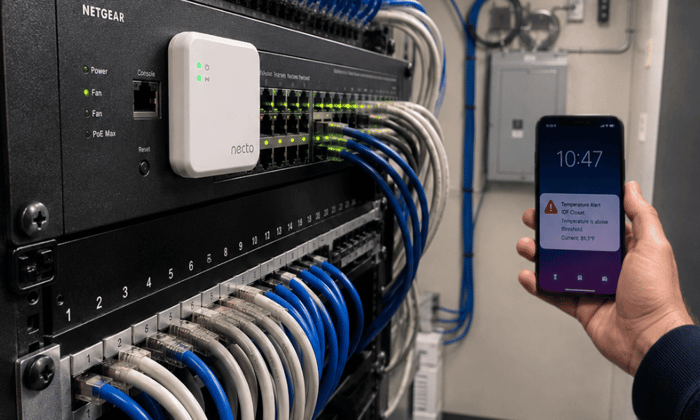
Most temperature monitors go quiet exactly when you need them most, during a power outage. Necto runs on a 72-hour rechargeable backup battery and reports over 4G cellular, so it keeps alerting even when building power and local network infrastructure are both down. It tracks temperature, humidity, and power status in one device, updates every 10 minutes under normal conditions, and switches to real-time reporting the moment conditions move outside set limits.
Where to Start With Server Room Temperature Monitoring
Getting server room temperature monitoring right is mostly a matter of scope and placement. A single wall sensor does not cover rack-level hot spots. Monitoring only temperature leaves you blind to the humidity conditions that cause corrosion and ESD damage. Skipping power monitoring means you find out about a cooling failure after temperatures have already climbed. And any monitoring solution that reports only over the local network has a blind spot during the events it most needs to cover.
The fix is not complicated. Sensors at rack inlets, humidity tracking, power status alerts, and at least one cellular reporting path cover the scenarios that cause the most expensive failures. Most server rooms, especially those without dedicated facilities staff, are one power event away from that gap mattering.
When a cooling failure and a network failure happen at the same moment, a monitor that reports only over the local network stops sending alerts exactly when you need them. Contact Necto today to get a cellular temperature and power monitor that stays active regardless of what the local infrastructure is doing.
FAQs
What temperature should a server room be kept at?
ASHRAE TC 9.9 recommends inlet air temperatures between 64.4 and 80.6 degrees Fahrenheit for standard A1-class servers. Most facilities target 68 to 77 degrees as a practical range, which provides enough margin below the upper threshold to absorb normal variation without triggering thermal shutdowns.
How often should server room temperature be monitored?
Monitoring intervals of 10 minutes are adequate under normal conditions. What matters more is whether the system switches to real-time reporting when a threshold is crossed. A 10-minute polling interval can miss a rapid spike in a small, high-density room. Necto updates every 10 minutes normally and reports in real time during alert events.
What humidity level is safe in a server room?
ASHRAE recommends 40 to 60 percent relative humidity. Below 40 percent, electrostatic discharge risk increases. Above 60 percent, the risk shifts to condensation and corrosion on circuit boards and connector contacts. Both conditions cause damage that can be difficult to trace back to humidity as the root cause.
Do I need an out-of-band monitor if I already have network-based temperature alerts?
Network-based alerts go silent when the local network loses power, which is often the same event that causes a cooling failure. Out-of-band cellular monitoring keeps alerting independently of local infrastructure. For any server room without redundant network connectivity, cellular monitoring covers the failure mode that network-dependent alerts cannot.
How many temperature sensors does a small server room need?
A room with one or two racks needs a minimum of two sensors: one at the rack inlet at mid-height and one near the cooling unit return. Rooms with more than two racks benefit from sensors at the inlet of each rack, particularly at the top of the highest-density equipment, where hot spots develop first.