Table of Contents
You have a UPS in your server room, and it works exactly the way it should when the power goes out. The servers stay up. The network keeps running. What most IT teams don't find out until they walk into a room full of red LEDs is that the UPS bought time for the equipment, not for the room. Server room UPS temperature monitoring is the piece that closes this gap, and most setups don't have it.
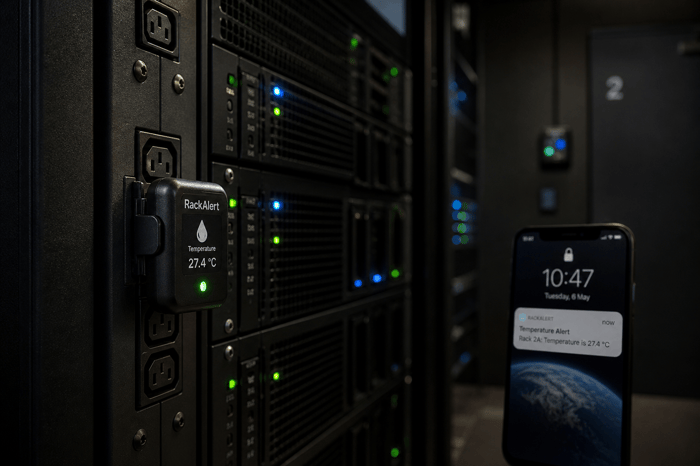
A UPS keeps servers running during a power outage but does not typically power the HVAC or CRAC units cooling the room. Servers keep generating heat while cooling stops. A 10 kW rack can reach dangerous inlet temperatures in under 15 minutes. Out-of-band cellular temperature monitoring is what catches this before hardware starts failing.
What a UPS Actually Does During a Power Outage
Most UPS systems in small server rooms are sized to keep IT equipment running long enough to shut down gracefully or wait for a generator to come online. That runtime varies by load and battery capacity, but five to fifteen minutes is typical for smaller units. What that runtime does not cover is the cooling infrastructure.
HVAC systems, CRAC units, and precision cooling equipment are rarely on the same UPS circuit as the servers. In many small installations, they are not on UPS backup at all. The moment the utility power drops, the cooling stops. The servers, now running on UPS power, keep generating heat with nowhere for it to go.
How Fast a Server Room Heats Up When Cooling Stops
The speed of temperature rise depends on rack density, room size, and airflow. In a low-density room with one or two lightly loaded racks, you might have 20 to 30 minutes before inlet temperatures reach a point where equipment begins to throttle. In a room with higher-density gear, that window shrinks fast.
A 10 kW rack in a standard server room can pass the 95-degree Fahrenheit throttle point in under 15 minutes when cooling stops. ASHRAE TC 9.9 Thermal Guidelines set the upper recommended inlet temperature for standard A1-class servers at 80.6 degrees Fahrenheit. Above that range, hardware lifespan shortens, and thermal shutdowns become more likely. At a power outage at 2 a.m., fifteen minutes is not enough time to respond if you don't know that the cooling stopped the moment it happened.
Hot air rises, and without active airflow management, the top of a rack can run 10 to 15 degrees warmer than the bottom. The first sign of a problem often appears at the highest-density rack in the room, and it can show up faster than the overall room temperature suggests.
Why Standard IP-Based Monitoring Fails at This Exact Moment
Most server room monitoring solutions report over the local network, the same network infrastructure that may lose power alongside the cooling. If the power event takes out the network switch, the router, or the monitoring gateway, the sensor that should alert you goes silent. You are not seeing a flat reading. You are seeing nothing.
A sensor that stops reporting is not the same as a sensor reporting that conditions are fine. When a monitoring system depends on the local network and that network is part of the failure, there is no alert at the moment you need one most.
The combination of servers running on UPS, cooling offline, room heating up, and monitoring going dark at the same time is specific to power events. It is also the most common scenario in which server room hardware actually gets damaged.
Out-of-Band Cellular Monitoring Closes the Gap
Out-of-band monitoring means the alert path does not share infrastructure with the system it is watching. For server rooms, that means a cellular connection that keeps reporting temperature and power status regardless of what happens to the local network.
A cellular monitor connected to 4G keeps alerting even when the switch is down, the router is offline, and the building network is dark. With an internal backup battery, it keeps running through the outage and sends alerts when power drops, when the temperature starts to climb, and again when power is restored.
For edge locations, branch offices, and small server rooms without redundant network paths, this independence is the difference between getting an alert at 2:05 a.m. and walking into a failed room the next morning.
Necto gives IT teams a cellular-based, out-of-band monitoring option that does not rely on the network it is meant to protect. It monitors temperature and power status around the clock, sends alerts via text and app when conditions go beyond safe limits, and continues running on its 72-hour battery through a power outage. For edge locations, remote IDFs, or data closets without reliable network access, it is a straightforward option. See getnecto.com for specs and pricing.
Before the Next Power Event
A UPS is a necessary part of server room protection. It buys time, prevents hard shutdowns, and protects equipment from power fluctuations. What it does not do is monitor the environment, alert anyone when cooling stops, or keep reporting over a network that just went dark.
The fix is out-of-band, cellular temperature and power monitoring that operates independently of everything else in the room. It does not replace the UPS. It watches what the UPS cannot: the air around your equipment while the UPS is doing its job.
When a power outage takes out your cooling and your network at the same time, a UPS alone won't catch the temperature climbing inside your server room. Contact Necto today and get a cellular temperature and power monitor that keeps alerting over 4G, independent of the network it is watching.
FAQs
Does a UPS protect a server room from overheating?
A UPS keeps servers running during a power outage but does not power the cooling systems that prevent overheating. If HVAC or CRAC units are not on a separate backup circuit, cooling stops the moment utility power drops while servers keep generating heat.
How quickly does a server room overheat during a power outage?
It depends on rack density and room size. A 10 kW rack can pass the ASHRAE-recommended 80.6-degree Fahrenheit inlet limit in under 15 minutes. Low-density rooms may have more time, but risk grows fast at higher loads.
What is out-of-band server room monitoring?
Out-of-band monitoring uses a communication path separate from the local network. For server rooms, this means cellular. A cellular monitor keeps sending alerts even when the local switch and router lose power, covering the blind spot that IP-based monitoring creates during a power event.
Should HVAC be on the same UPS as the servers?
Most small server rooms don't put cooling equipment on UPS at all. Having temperature monitoring over a cellular path means you know immediately when cooling stops, regardless of what else is down.
How does Necto monitor a server room during a power outage?
Necto monitors temperature and power status over 4G cellular, independent of the local network. It sends alerts when power drops, when temperature rises above set thresholds, and when power is restored. Its 72-hour internal battery keeps it running through an extended outage.